According to my email history, I've been using DigitalOcean since 2013. In that interval, I've gone through about five iterations of VMs, for self-hosting my ever-increasing levels of nonsense. Every time I migrate to some new and shiny VM, I use DigitalOcean's Snapshot feature to preserve the old VM in case I forgot something important on there.[1]
What this means in practice is that I've accumulated a small graveyard of old VMs, and since I'm only running a single tiny $6 / month instance, I'm actually spending more on snapshots than I am on VMs.
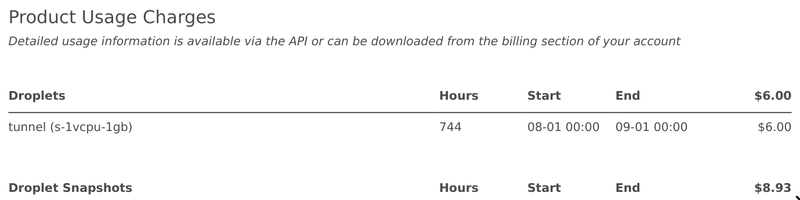
I opted to omit the actual per-VM breakdown for the snapshots, you never know what you're giving away in a screenshot.
I've thought about this approximately once a month for the past several years, but never did anything about it. Until now. Such foreshadowing!
Snapshots, and the Economics Thereof
Pricing for DigitalOcean's Snapshots, at the time of writing, is $0.06 per GB.
As a point of reference, pricing for Backblaze B2 is $6.95 per TB, or $0.00695 per GB. Note the extra zero after the decimal place.
This is all to say that DigitalOcean is charging an ~8.5x premium for the storage of these snapshots. That's all well and good and fine, but I basically treat these as cold backups for some unforeseen emergency, and there's really no reason for me to pay that premium except for convenience.
Paying the Piper
Speaking of convenience, DigitalOcean conveniently provides no way to download your snapshots.[2] This is probably why I've let this go on for so long. If you want to export your snapshots, you have to spin up a VM from the snapshot, and then image the disk...which was just created from an image you don't have direct access to. Pretty silly stuff.
This is annoying for a bunch of reasons, most of which boil down to "some of these VMs are 12+ years old and janky as all hell". The implications of this are:
- I have no idea what I'll be serving to the internet when the VM comes up.
- Or what kind of outbound requests I'll be sending!
- I don't even know if I can properly SSH into it[3]
And this makes the process a lot more convoluted than "spin up a VM from the snapshot and image it", now it's something like:
- Create a tag like
no-network-access - Create a firewall that denies all inbound + outbound traffic[4]
- Create the VM from the snapshot, with some SSH keys + the tag you just created
- Image the machine
- Upload the image somewhere
This isn't too bad, but I hit a lot of complications in the process. For example, I originally tried to use a VPC so that the hydrated snapshot VM wouldn't have any public access at all, but I was getting errors like:
HTTP 422

{
  "id":"unprocessable_entity",
  "message":"Droplets created from this image require public networking"
}
Which is both totally unambiguous and completely unhelpful.
And for reasons I still don't know, I couldn't get functional SSH access to some of the VMs, so I had to shut them off, reboot into the Recovery ISO, and then image the disk from there. There's no API for doing this, so this part has to be done manually.
Silver lining: we live in the future
One thing that made everything less tedious is that LLMs exist now and can full-send stuff like this, which is how the dosnap CLI came into being.[5] It automates basically the whole process (modulo the Recovery ISO fallback), and uploads the disk images to Backblaze via restic, which I've talked about before because I'm a big fan. It also does other fancy things like zero out the free disk space with dd to make it more likely the disk image compresses well. Here's a little sample of what using it looked like:
$ uv run dosnap list

NAME          SIZE     DISK    REGIONS   STATE
server1      7.6 GB    20 GB    nyc1     verified
server2     12.8 GB   160 GB    sfo2     verified
server3     17.7 GB    40 GB    sfo2     verified
server4     19.4 GB    80 GB    sfo2     verified
server5     91.2 GB   160 GB    sfo2     verified
And some idealized example output from archiving:
$ uv run dosnap archive server5

### region sfo2: 1 snapshot(s)
collector at a.b.c.d
installing restic and staging credentials in tmpfs...

=== server5 (91.2 GB) ===
  restoring onto s-2vcpu-8gb-160gb-intel (160 GB disk) in sfo2
  droplet at e.f.g.h (public, deny-all firewall)
  ssh ok as core
  quiescing + zeroing free space...
  device /dev/vda, 171.8 GB, CRASH-CONSISTENT (root stayed rw)
  20 part(s), 0 already done
  part 1/20: 8.6 GB -> restic
    ok  sha256=aaaaaaaaaaaaaaaa...  restic=000000000000

    ... eighteen more parts ...

  part 20/20: 8.6 GB -> restic
    ok  sha256=ffffffffffffffff...  restic=111111111111
  verifying against the repository...
  verified: 20 part(s) match
  destroying target droplet

destroying collector

Archive complete
After all was said and done, my Restic repository looked something like:
$ restic -r s3:s3.us-west-004.backblazeb2.com/$BUCKET_NAME snapshots

Host         Tags                       Paths                Size
----------------------------------------------------------------------
dosnap-nyc1  name-server1               /disk.raw           25.000 GiB
dosnap-sfo2  name-server2,part-00000    /disk.raw.part00000  8.000 GiB
                                                ⋮
dosnap-sfo2  name-server2,part-00019    /disk.raw.part00019  8.000 GiB
dosnap-sfo2  name-server3               /disk.raw           50.000 GiB
dosnap-sfo2  name-server4,part-00000    /disk.raw.part00000  8.000 GiB
                                                ⋮
dosnap-sfo2  name-server4,part-00009    /disk.raw.part00009  8.000 GiB
dosnap-sfo2  name-server5,part-00000    /disk.raw.part00000  8.000 GiB
                                                ⋮
dosnap-sfo2  name-server5,part-00019    /disk.raw.part00019  8.000 GiB
----------------------------------------------------------------------
I haven't tried to restore or otherwise use these backups yet, thus breaking the zeroth rule of backups.[6] But hey, I like to live dangerously and it's not like I ever looked at the snapshots before now anyway.
The Final Tally
On DigitalOcean, I was paying $0.06/GB/mo for 148.85 GB = $8.93/mo. But because of the magic of compression and deduplication, that same data on Backblaze only takes up 61.1 GB. So at $0.00695/GB/mo, I'm now paying about $0.43/mo, a whopping 95% decrease.
Was it worth a few bucks in tokens and a dozen hours of my life to save $100 a year? Probably not, but it's not about the money, it's about sending a message …the friends we made along the way?
-
But really, it's just because I'm a data hoarder in denial ↩
-
For example, an image from 2012 doesn't even have support for ED25519 keys, so you need to make RSA keys for it ↩
-
But don't forget to poke a hole for your local connection (or another VM) to allow inbound SSH + exporting the image ↩
-
This is normally the point where I'd link to the MIT-licensed repo where I published the project, but the code is pretty janky and has some hardcoded bits and I really don't want to be liable for someone losing their data or running up a large cloud bill. Email me if you'd like to use the code and I'll send it over with some appropriate caveats. ↩
-
The rule is something like "if you haven't successfully restored them, you don't really have backups yet" ↩