There's an oft-repeated nerd joke that goes something like:
The "S" in IoT stands for "Security"[1]
And it's one of those things that's funny because it's unfortunately true. IoT devices tend to have terrible security postures and are vulnerable to all sorts of exciting attacks. Some attacks require physical proximity, but others leverage the cloud services these IoT devices phone home to, which tend to also be pretty weak on the security front.
My personal stance towards IoT devices can be neatly summed up by this tweet:

And my printer doesn't have Wi-Fi or Bluetooth or anything.
It's hooked to a Raspberry Pi, which exposes a CUPS server to a trusted network
So yeah, I have no smart bulbs, smart TVs,[2] smart locks, smart appliances, or anything else that manufacturers have shoved the word "smart" (or worse, "AI") in front of. I turn my lights on and off by walking over to the switch and flipping it, like a Neanderthal. It's great.
But this is a post about IoT devices, so clearly something is going to change. What follows is my journey attempting to set up an Io(S)T — Internet of (Secure?) Things.
The Fever Dreams of a Dying Thermometer
One very very not-smart thing we have is a set of indoor/outdoor thermometers.[3] But recently, tragedy struck:
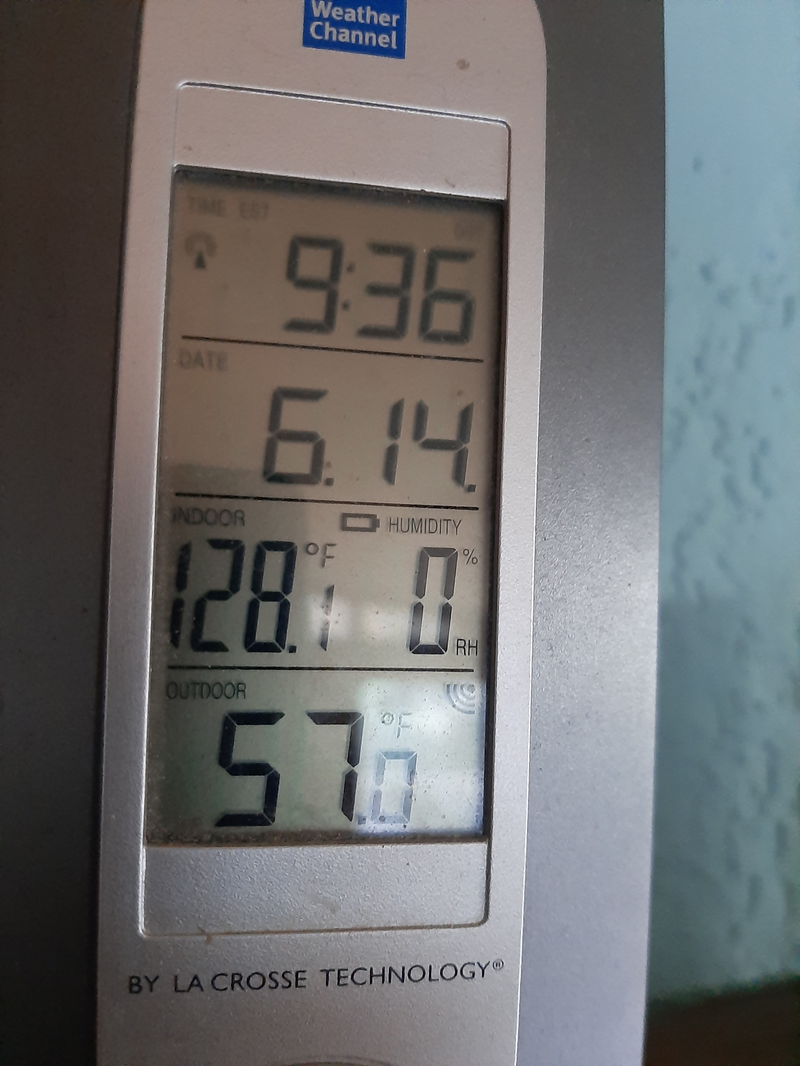
As you've probably guessed, it's not actually 128° F inside.
Also the battery is fine, that's (sadly) not the issue.
I poked and prodded the thing a bit, and have concluded it's probably toast. Normally, I'd just toss it and continue on with my life, but it turns out that knowing the current indoor + outdoor temp is important for our day-to-day routine. It's more or less the sole input in deciding when to turn on our whole-house fan.
You see, once the outdoor temp drops down towards the indoor temp in the evening, we open all the doors + windows + turn the fan on low. It pulls the cooler, drier outdoor air through the house and into the attic. In the morning, we shut it off and close all the doors + windows, and the house passively stays cool[4] for the whole day. Combined with some sun-reflecting window shades, it's an extremely energy-efficient way to regulate indoor temps in the summer. We basically never run our mini-split for cooling, even when it's 100° F (or more!) outside.
So I was in the market for some new thermometers. But I also saw an opportunity to dream bigger. We live in a wildfire-prone area, and we cook dinner most nights. The commonality between those two seemingly random statements is air quality.[5] When there's wildfire smoke outside, we run a box fan with some HVAC filters duct taped to it,[6] and when we cook, we run the range hood. But how well do these actually work? I didn't really have any way of knowing!
Long story short, I ended up buying two AirGradient sensors — one indoor and one outdoor unit.[7] These measure temperature + humidity like our ill-fated old units, but also measure a bunch of other stuff. Of particular interest to me:
- CO2 - Useful for two people who work from home. And as mentioned above, who keep the doors + windows closed for most of the day during the summer.
- PM2.5 - Useful during wildfires + to see how cooking affects indoor levels.
The problem is that now I own IoT devices, which I'm metaphysically allergic to. What do I do?

Doing IoT Science
The TL;DR is that I put the new sensors on a dedicated Wi-Fi network that doesn't have internet access. But the full setup is a bit more involved. The rest of this post will lay that out. I did all of this configuration on a router running OpenWRT, but similar settings should be available on most routers.
Threat Modeling
Before we can "secure" our newfangled IoT devices, we first need to ask: what are we even securing against? Security doesn't exist in a vacuum, it doesn't make sense to just "make things secure". You need to understand what you're securing things from. In our case, the threat vectors look something like:
- A device getting compromised by a bad actor
- Either remotely, or within wireless range
- From there, it could become part of a botnet, shady residential proxy, or be used to probe the rest of my home network and move laterally.
- Data from a device being accessed by unauthorized third-parties
- This could happen by a breach of the cloud service, some local misconfiguration, etc
I'm explicitly not worried about attacks that require physical access to the devices. If someone is physically in my house, tampering with my hardware, I clearly have bigger problems to worry about.
The Setup
With our threat model in mind, we have a pretty clear idea of how we should set everything up:
- Disable all cloud/remote features on the devices
- Set up a new isolated, airgapped Wi-Fi network
- Pull data from the devices into a local Prometheus/Grafana instance
- Those services are accessible via Tailscale so I can monitor them from wherever without exposing them to the wider internet
The Wi-Fi network
Most IoT devices use one of a handful of inexpensive microcontrollers, which tend to only support 2.4 GHz Wi-Fi, i.e. they don't support modern 5 GHz networks. The AirGradient sensors are no exception, they use an ESP32-C3-MINI.
So I set up a new <network name>-Sensors 2.4 GHz-only network and attached a new iot interface to it. The iot interface isn't allowed to send traffic to any other interfaces, but our trusted interface (where our server and personal device lives) is allowed to initiate connections to it. This allows us to poll the devices for updated sensor data.
The iot network also doles out DHCP addresses on 192.168.2.1/24. We then give static leases to the IoT devices so that their IP addresses remain stable.
I read that some IoT devices can get cranky if they can't connect to DNS or NTP. I don't think this is true for AirGradient devices, but in any case I added rules to intercept DNS + NTP requests coming from the iot network, roughly following these instructions. The router is running its own NTP + DNS servers, meaning it can satisfy both types of requests. It gives me the ability to introspect the traffic and make sure nothing shady is going on (e.g. devices trying to resolve C&C servers).
I also had a hell of a time getting the AirGradient devices to actually connect to the new Wi-Fi network. After a lot of rifling around in the router logs, running tcpdump, and harried internet searching, I tweaked two Wi-Fi settings for the network:
- Disable Wi-Fi Multimedia (WMM) Mode
- Disable "Disassociate on Low Acknowledgment"
Frankly, I changed a lot of random toggles in this time period, so I'm not 100% sure this is exactly what fixed it. Let's call it 72% sure.
Device Configuration
I first flashed the latest firmware to both devices. Much to my delight, I was able to do this directly from Firefox.[8]
After plugging them in, they advertise their own Wi-Fi network, which you can connect to from a phone or laptop and access a configuration UI via the web. This allows you to enter your real Wi-Fi network credentials, at which point you're off to the races!
Once they had IP addresses on the network, I sent some requests to their local server API to change a few configuration parameters:
function update_config {
  curl \
    -X PUT \
    -H "Content-Type: application/json" \
    -d "$1" \
    http://192.168.2.x/config
}

# "I'm in 'murica, I want FREEDOM units" (Happy 4th of July btw)
update_config '{"country":"US"}'
update_config '{"temperatureUnit":"f"}'

# "Don't even _think_ about talking to the damn internet"
update_config '{"disableCloudConnection":true}'
update_config '{"configurationControl":"local"}'
update_config '{"postDataToAirGradient":false}'
At this point, they're connected, airgapped from the internet, configured to not cause trouble, and measuring stuff with their sensors. Now we just need to actually retrieve that sensor data.
Prometheus + Grafana
In previous incarnations of my home lab, I had set up Prometheus + Grafana to get basic system health metrics. But that's because I was running a blade server old enough to get a drivers license, my mini PC home lab has been so stable (and not resource-constrained) that I never felt a need to monitor it.
But now we have actual sensors, so I set up a Prometheus (actually VictoriaMetrics) instance, and threw in node_exporter for good measure. The scrape config looks something like this:
global:
  scrape_interval: 30s

scrape_configs:
  - job_name: victoriametrics
    static_configs:
      - targets: ["localhost:8428"]

  - job_name: node-exporter
    static_configs:
      - targets: ["node-exporter.kube-system.svc.cluster.local:9100"]

  - job_name: airgradient
    static_configs:
      - targets: ["192.168.2.x"]
        labels:
          location: indoor
      - targets: ["192.168.2.y"]
        labels:
          location: outdoor
And then I set up Grafana and pulled in one of the pre-existing AirGradient dashboards. Et voila:
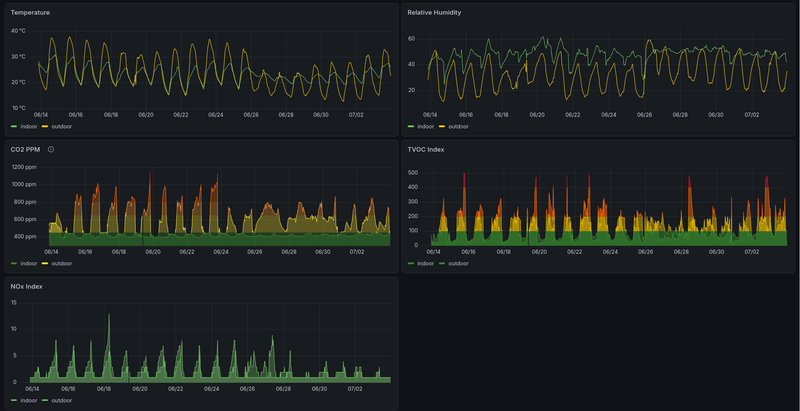
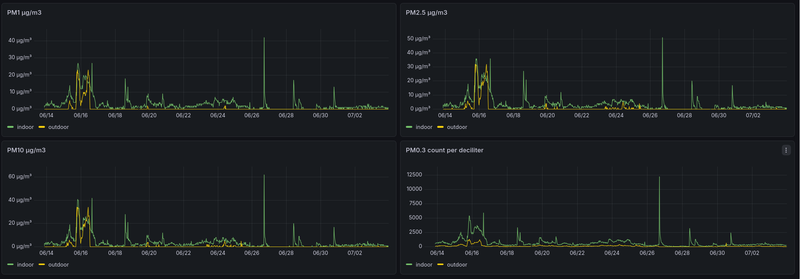
I found this data fascinating, as there are lots of clear trends in it. I can tell which days I was running the ceiling vent at night versus not, and what days my partner and I were both in the house for a while. There are clear cyclic trends in TVOC + NOx, likely related to our proximity to a major road. Spikes in indoor PM2.5 correspond to times when I was sautéing things and not running the range hood for whatever reason. Outdoor (and indoor!) spikes correspond to nearby wildfires.
Alerts
And what's cool is that not only can I look at this data, I can alert on it. I've set up a few basic alerts that likely mean something needs my attention:
| Situation | Action I should probably take |
|---|---|
| PM2.5 greater than 35 μg/m3 | If both sensors read high, close the doors + windows + run the box fan air purifier. If just indoor, run the range hood. |
| CO2 greater than 1500 PPM | This would likely only happen on the indoor sensor, which means we have too many people inside and not enough windows open. |
| Indoor temp below 40° F | Turn on the heater so the pipes don't freeze. |
| Indoor temp above 100° F | Turn on the actual A/C so our animals don't melt. |
| No new sensor data | Check if there's a hardware failure or a power outage.[9] |
All of these alerts come through as texts on my phone.[10]
IoST?
Overall, I'm pretty happy with this setup. Not so happy that I'd consider adding more devices or whatever. But it's low maintenance, provides me with useful data and alerts, and has enough defense-in-depth in the security posture that I don't feel like it's a massive liability. Definitely strikes the right balance for me.
-
Hell, there's not even regular TVs ↩
-
We inherited these with the house ↩
-
10-20° F cooler than outside, which is pretty awesome ↩
-
I really like this Dynomight blog post ↩
-
Called a Corsi-Rosenthal Box ↩
-
Specifically, I got the DIY kits because they're like $100 cheaper and only took like 10 minutes to put together ↩
-
It's probably because I'm running Firefox Developer Edition, as MDN does not show Firefox as supporting WebUSB ↩
-
The server is on a UPS, so even when the house loses power it'll stay up for a while, ↩
-
Via a custom webhook notification integration + a tiny internal service, as Grafana alerting doesn't natively support Twilio/SMS integration. ↩